English
Bluetooth
Update history
| Date | Version | Author | Update content |
|---|---|---|---|
| 2026-01-12 | 1.0.1 | lxowalle | Updated method for using Bluetooth |
| 2025-04-08 | 1.0.0 | lxowalle | Initial document |
Instructions
Bluetooth is a common short-range wireless communication technology mainly used to establish low-power, point-to-point or local network connections between two or more devices. It operates in the 2.4GHz frequency band and was originally designed to replace wired data cables for small data transmissions between devices. In modern life, Bluetooth has become a widely used technology in our daily activities. For example, when driving, we can connect a phone to the car’s Bluetooth system to make hands-free calls or play music; Bluetooth headsets free us from the constraints of wired earphones when listening to music or making calls; in smart homes, Bluetooth enables interaction with smart locks, lighting, temperature and humidity sensors, and more, creating a convenient and efficient living environment.
Usage Method
Note: Supported from MaixPy v4.12.4 onwards
Enable Bluetooth
The Bluetooth function is not enabled by default. Run the following command to enable Bluetooth.
bluetoothctl power on
You can also run the following command to enable Bluetooth automatically on each boot.
echo "bluetoothctl power on" >> /etc/rc.local
Install Dependencies
Run the following command to install the bleak package.
pip install bleak
Run Bluetooth Programs
Scan for nearby Bluetooth devices
import asyncio
from bleak import BleakScanner

async def main():
    devices = await BleakScanner.discover()
    for d in devices:
        print(d)

asyncio.run(main())
Connect Bluetooth
import asyncio
from bleak import BleakClient

address = "24:21:32:e3:01:87"
MODEL_NBR_UUID = "1A2A"

async def main(address):
    async with BleakClient(address) as client:
        model_number = await client.read_gatt_char(MODEL_NBR_UUID)
        print(f"Model Number: {model_number.decode()}")

asyncio.run(main(address))
Here, we only cover the basic usage of bleak for Bluetooth. If you have more development requirements, please refer to here.
Usage Method (Legacy, Not Recommended)
Note:
MaixPy v4.12.3and earlier versions require support in this way. Later versions use the SDIO protocol, so soldering the resistor array is no longer necessary.
Preparation
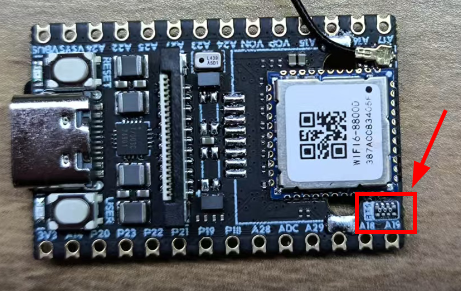
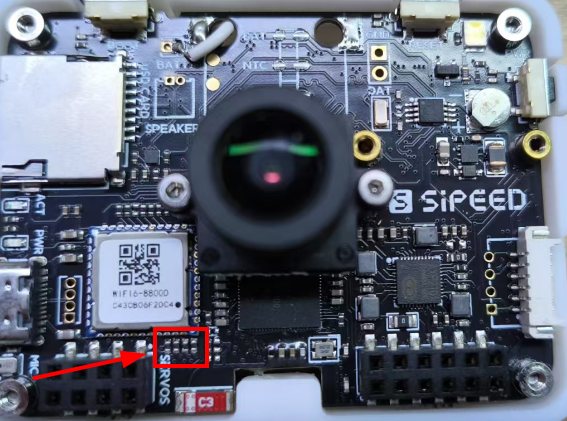
MaixCAM and MaixCAM-Pro come with a built-in AIC8800D Wi-Fi/Bluetooth dual-mode chip. However, due to limited IO resources, the main controller is not connected to Bluetooth by default. To enable Bluetooth, you need to solder a 0-ohm resistor between the following pins and the Bluetooth path: GPIOA18, GPIOA19, GPIOA28, and GPIOA29.
The position for soldering the 0-ohm resistors on MaixCAM is shown below:
The position for soldering the 0-ohm resistors on MaixCAM Pro is shown below:
The following section demonstrates basic Bluetooth use from the command line. Building a complete Bluetooth application also requires choosing a profile and handling pairing, permissions, and reconnect behavior.
Enabling Bluetooth
hciattach -n /dev/ttyS1 any 1500000 &
hciconfig hci0 up
Connecting a Bluetooth Mouse
Here, we use the bluetoothctl tool to configure Bluetooth:
bluetoothctl			# Start bluetoothctl

##  Enter the following commands in the bluetoothctl terminal ##
power on              # Turn on Bluetooth
agent on              # Enable agent
default-agent         # Set as default agent
scan on               # Start scanning for devices

# After finding the target Bluetooth MAC address during scan
pair {device MAC address}        # Pair with the device
trust {device MAC address}       # Trust the device
connect {device MAC address}     # Connect to the device

# Exit after successful connection
exit
Verify mouse data:
# Run hcidump to observe all HCI messages printed in the terminal
hcidump

# Run btmon to observe captured HCI events
btmon